




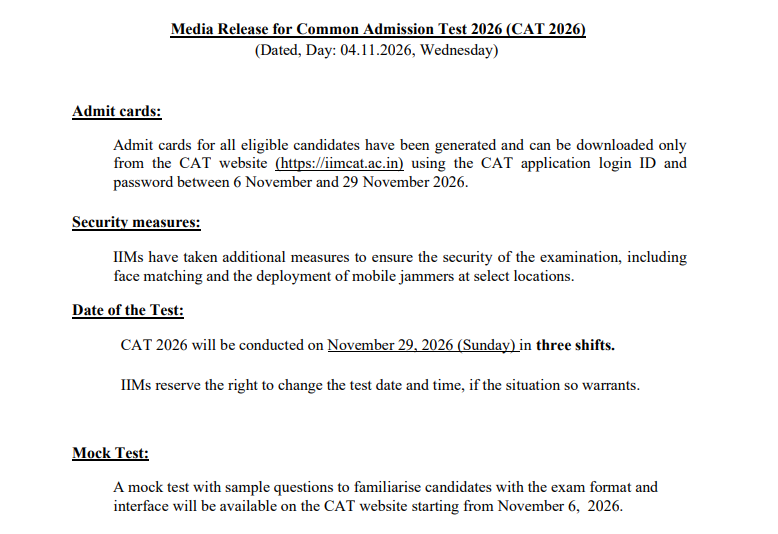
IIM Indore has postponed the CAT Admit Card 2026 release date from November 4 to November 6, 2026, as reported. Registered candidates can download the hall ticket at iimcat.ac.in until the exam on November 29.
- The admit card download window is November 6 to November 29, 2026. The release time is not announced yet.
- Candidates log in with their CAT 2026 credentials at iimcat.ac.in to download the hall ticket.
- CAT 2026 is on Sunday, November 29, in three sessions. IIM Indore is the conducting institute.
- Carry a printout of the admit card and a valid photo ID to the test centre.
Related Links:
- Check CAT Admit Card 2026 Live Updates.
- Detailed Step by Step Process to Download CAT 2026 Admit card

CAT 2026 Admit Card Key Summary
|
Detail |
Information |
|
Revised download date |
November 6, 2026 (earlier November 4), as reported |
|
Download window |
November 6 to November 29, 2026 |
|
Release time |
Not announced |
|
Official website |
iimcat.ac.in |
|
CAT 2026 exam date |
November 29, 2026 (Sunday), 3 sessions |
|
Conducting institute |
IIM Indore |
What Has Changed in the CAT 2026 Admit Card Date?
Earlier, the CAT 2026 information bulletin listed the admit card download date as November 4. Education publishers now report that IIM Indore has revised the date to November 6, 2026. The download window still closes on exam day, November 29.
|
Item |
Earlier |
Revised (as reported) |
|
Admit card date |
November 4, 2026 |
November 6, 2026 |
|
Last date to download |
November 29, 2026 |
November 29, 2026 |
|
Release time |
Not announced |
Not announced |
|
CAT 2026 exam date |
November 29, 2026 |
No change |
Download the Official CAT Media Release Notice PDF
How to Download CAT 2026 Admit Card: Step-by-Step
Follow these steps carefully to download your CAT 2026 admit card from the IIMCAT official portal without any issues:
- Open your browser and go to iimcat.ac.in.
- Click the Admit Card or Download Hall Ticket link on the homepage.
- Enter your registered email address (used during CAT 2026 application) as the User ID.
- Enter the password you set during registration.
- Click Login to reach your application dashboard.
- Click the Download Admit Card button on the dashboard.
- Your admit card will open as a PDF in a new browser tab.
- Save the PDF and print it on A4 size paper. A colour printout is strongly preferred.
Keep at least two printed copies — one to carry into the exam hall and one as a backup. Do not fold or laminate the printout.
Check: CAT 2026 Admit Card Download on Mobile: Steps, PDF Saving and Printing Tips
Details Mentioned on CAT 2026 Admit Card
Check every detail on your admit card immediately after downloading. If you spot any discrepancy contact the CAT 2026 helpdesk before the correction window closes. Your admit card will contain the following information:
| Detail on Admit Card | Why It Matters |
|---|---|
| Candidate Name | Must match your photo ID exactly |
| Registration Number | Your unique CAT 2026 identifier |
| Exam Date and Day | Your assigned test slot date |
| Reporting Time and Gate Closing Time | Arrive at least 30 minutes before reporting time |
| Test Centre Name and Address | Full address of your assigned test centre |
| Exam Session (Slot) | Morning, Afternoon, or Evening slot |
| Photograph and Signature | Uploaded during registration; must be clear and recognisable |
| Important Exam Day Instructions | Items allowed and prohibited inside the exam hall |
Common CAT 2026 Admit Card Errors and How to Fix Them
Many students face problems while logging in or downloading the admit card on the first attempt. Here are the most common issues and their step-by-step fixes:
| Error | Likely Cause | Fix |
|---|---|---|
| Invalid User ID or Password | Incorrect email or password entered | Re-enter the exact email used during registration; use Forgot Password if needed |
| Page Not Loading or Server Error | High traffic on the portal after admit card release | Wait 30 minutes and retry; use Google Chrome; clear browser cache and cookies first |
| Admit Card PDF Not Opening | Browser PDF viewer conflict or pop-up blocked | Download the PDF directly and open it with Adobe Acrobat Reader |
| Blurry Photo or Signature | Low-resolution image uploaded during registration | Contact the CAT helpdesk immediately and request a correction before the window closes |
| OTP Not Received | Network delay or wrong mobile number on record | Wait 5 minutes and click Resend OTP; check the registered number in your application form |
| Name or Date of Birth Mismatch | Data entry error during registration | Email the CAT helpdesk with your registration ID and a Class 10 mark sheet as proof |
| Wrong Test Centre Displayed | System or preference allocation issue | Contact CAT helpdesk at iimcat.ac.in; centre changes are subject to availability |
Forgot IIMCAT Login Credentials? Here Is What to Do
If you cannot log in because you have forgotten your password or lost access to your registered email follow these steps to recover your account:
- Go to iimcat.ac.in and click Forgot Password on the login page.
- Enter your registered email address in the field provided.
- A password reset link will be sent to that email address. Check your spam or junk folder if the email does not appear in your inbox within a few minutes.
- Click the reset link, create a new password, and log in to download your admit card.
If you have also lost access to the registered email account, contact the CAT 2026 helpdesk whose details are listed on iimcat.ac.in. Provide your full name, date of birth, and registration details to verify your identity and regain access.
Check: CAT 2026 Admit Card: 5 Things Candidates Should Check Before November 6
CAT 2026 Admit Card FAQs
Ques. When will the CAT 2026 admit card be released?
Ans. As per the official update, the CAT 2026 admit card will be released on 6 November 2026, approximately two to three weeks before the exam date.
Ques. Where can I download the CAT 2026 admit card?
Ans. You can download the CAT 2026 admit card from the official IIMCAT portal at iimcat.ac.in. Log in with your registered email address and the password you set during registration.
Ques. What documents must I carry on CAT 2026 exam day?
Ans. You must carry a printed copy of the CAT 2026 admit card and one valid original photo ID such as an Aadhaar card, passport, driving licence, or PAN card. Students with disability must also carry their PwD certificate if applicable.
Ques. What should I do if there is an error on my CAT 2026 admit card?
Ans. Contact the CAT 2026 helpdesk via the email address or phone number listed on iimcat.ac.in immediately after spotting the error. Submit your registration ID and supporting documents such as a Class 10 certificate to request a correction before the window closes.
Ques. Can I show the CAT 2026 admit card on my phone at the test centre?
Ans. No. You must carry a physical printout of the admit card on A4 paper. A digital copy on a phone or tablet is not accepted at the test centre gate.
Ques. Is there any fee to download the CAT 2026 admit card?
Ans. No, downloading the CAT 2026 admit card is completely free. You only need your login credentials to access it from iimcat.ac.in.



Comments