



| Updated On - Jun 19, 2026
NIT Tiruchirappalli will declare the NIMCET 2026 result on June 29 at nimcet.admissions.nic.in. Candidates can log in with their hall ticket number and password to download the scorecard. Counselling registration begins June 30.

The National Institute of Technology Tiruchirappalli (NIT Trichy) will declare the NIMCET (NIT MCA Common Entrance Test) 2026 Result on June 29, 2026. The scorecard will be hosted on the official portal at nimcet.admissions.nic.in. Candidates can log in using their hall ticket number and password.
The NIMCET 2026 result will carry the candidate's sectional marks, total score, and All India Rank (AIR). NIT Trichy is coordinating this year's examination on behalf of 11 NITs and 2 IIITs. The result will be used for admission to the two-year MCA programme offered by these 13 institutes.
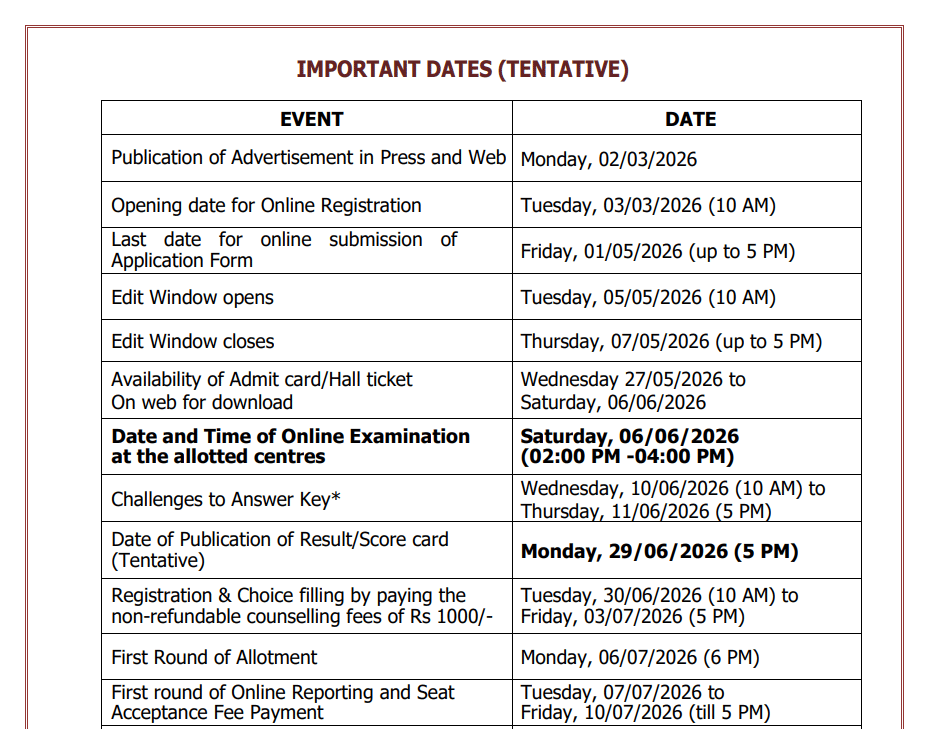
NIMCET 2026 Key Dates
| Event | Date |
| Exam Date | June 6, 2026 |
| Provisional Answer Key Release | June 10, 2026 |
| Answer Key Objection Window | June 10 to June 11, 2026 |
| Result Declaration | June 29, 2026 |
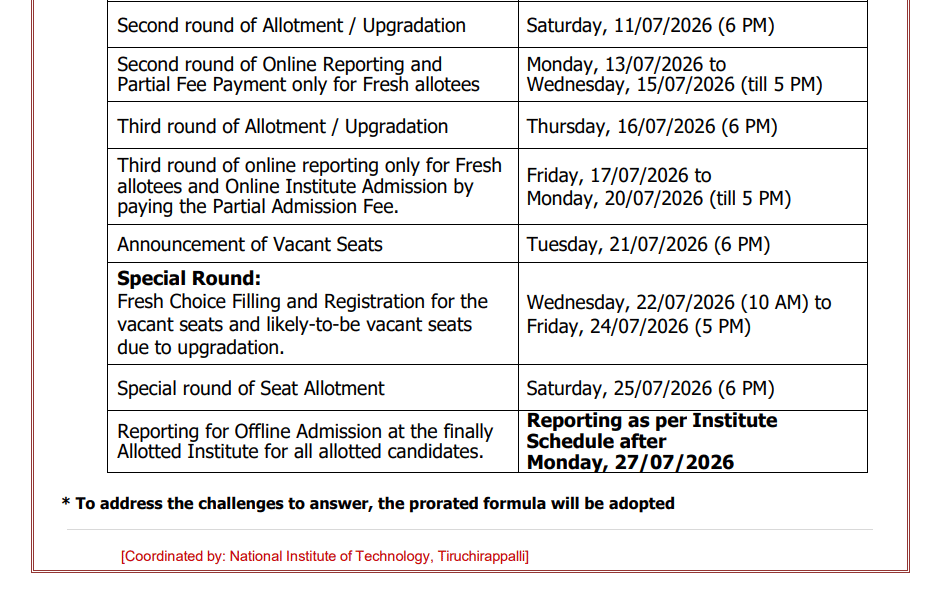
| Counselling Registration | June 30 to July 3, 2026 |
| Round 1 Seat Allotment | First Week of July 2026 |
How to Download the NIMCET 2026 Scorecard?
The scorecard will be available only on the official portal after 5 PM on June 29, 2026. Candidates must keep their login credentials ready. Follow the steps below:
- Visit the official website at nimcet.admissions.nic.in.
- Click on the "NIMCET 2026 Result" or "Scorecard" link on the homepage.
- Enter your Hall Ticket Number (User ID) and Password.
- Click on Submit to view your scorecard.
- Download the scorecard and keep a printed copy for counselling.
Also Check: WBJEE 2026 Final Answer Key Released
Details Mentioned on the NIMCET 2026 Scorecard
Candidates should carefully verify all information mentioned on the scorecard. Any discrepancy should be reported to the NIT Trichy Helpdesk.
The scorecard will contain:
- Candidate's Name
- Roll Number
- Application Number
- Date of Birth
- Category
- Gender
- Section-wise Marks
- Total Marks (Out of 1000)
- All India Rank (AIR)
Participating Institutes Through NIMCET 2026
The NIMCET 2026 score is accepted by 11 National Institutes of Technology (NITs) and 2 Indian Institutes of Information Technology (IIITs) for MCA admissions. Approximately 1,300 seats will be allotted through the centralised counselling process.
Participating NITs
- NIT Agartala
- NIT Allahabad
- NIT Bhopal
- NIT Delhi
- NIT Jamshedpur
- NIT Kurukshetra
- NIT Meghalaya
- NIT Patna
- NIT Raipur
- NIT Tiruchirappalli
- NIT Warangal
Participating IIITs
What Comes After the Result?
The NIMCET 2026 Counselling Registration process will begin on June 30, 2026 through the same official portal. Candidates must complete their choice filling and preference locking within the prescribed deadline.
The seat allotment process will be based on:
- All India Rank (AIR)
- Category
- Institute Preferences
- Choices Locked During Counselling
The Round 1 Seat Allotment Result is expected to be released in the first week of July 2026.
Also Check: CENTAC UG Non-NEET 2026 Provisional Merit List Out
NIMCET is the only national gateway to MCA seats at top NITs and IIITs. A strong rank can secure a seat at NIT Trichy or NIT Warangal. Both are among the highest ranked tech institutes in India.
Action Plan for Candidates
- Keep your hall ticket number and password ready before June 29.
- Log in to nimcet.admissions.nic.in after 5 PM to check the result.
- Download and save multiple copies of your scorecard.
- Register for counselling between June 30 and July 3, 2026.
- Research participating institutes and lock your choices early.
- Keep originals of Class 10, Class 12, and graduation certificates ready.
Watch the official portal for the counselling registration link and the Round 1 seat allotment list expected in the first week of July 2026.
Also Read:












Comments