

![Sri Venkateswara University - [SVU]](https://img.collegedunia.com/public/college_data/images/logos/1480418256thumb.jpg?h=71.7&w=71.7&mode=stretch)
.png?h=18&w=18&mode=stretch)
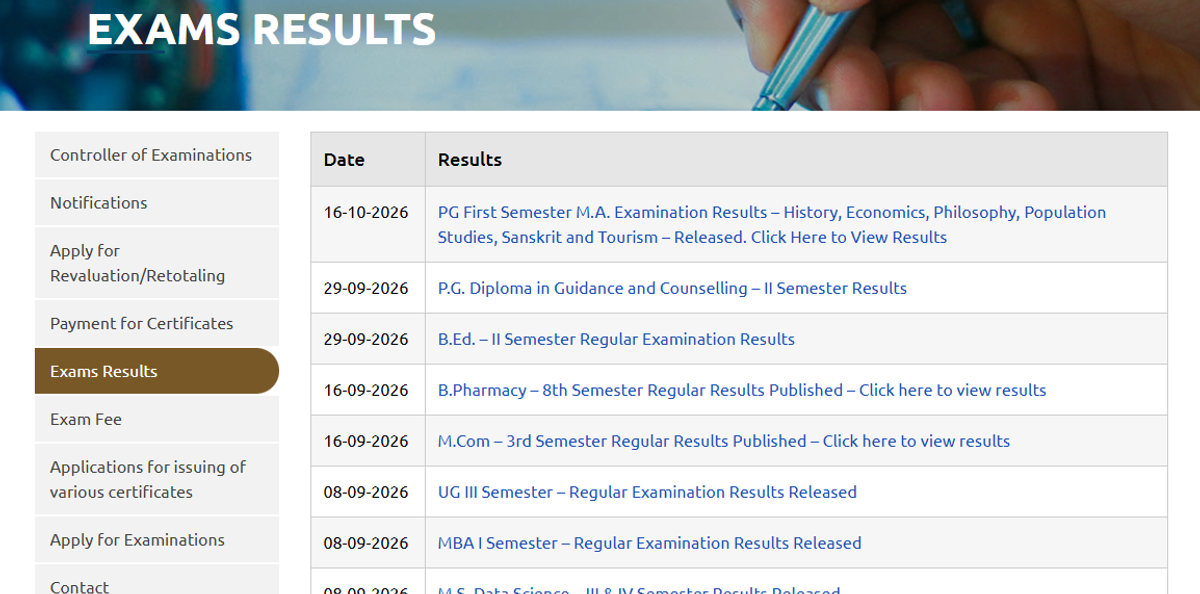
UG III Semester results came out on September 8, 2026. UG Fifth Semester results came out on June 18, 2026. Results for B.Ed., B.Pharmacy, MBA, MCA and LL.M. were also released between May and September.
All results now open on the TCS iON Self Service portal. There is no public PDF list. Students log in with the hall ticket number in the form HallTicketNumber@svu.com. The college shares the password. Students collect it from their college office. The date-wise list is on the official svuniversity.edu.in results page.

SVU Result 2026 Date Wise
The table below lists the SVU results declared in 2026, newest first. Each row opens the official login page where that result is available.
| Result Date | Course and Semester | Result Link |
|---|---|---|
| October 16, 2026 | M.A. I Semester (History, Economics, Philosophy, Population Studies, Sanskrit, Tourism) | Check Here |
| September 29, 2026 | PG Diploma in Guidance and Counselling II Semester | Check Here |
| September 29, 2026 | B.Ed. II Semester Regular | Check Here |
| September 16, 2026 | B.Pharmacy VIII Semester Regular | Check Here |
| September 16, 2026 | M.Com III Semester Regular | Check Here |
| September 8, 2026 | UG III Semester Regular | Check Here |
| September 8, 2026 | MBA I Semester Regular | Check Here |
| September 8, 2026 | M.S. Data Science III and IV Semester | Check Here |
| September 1, 2026 | LL.M. I, II and III Semester Regular | Check Here |
| August 24, 2026 | MCA III Semester Regular | Check Here |
| August 24, 2026 | B.Pharmacy I, III, V and VII Semester Regular | Check Here |
| August 24, 2026 | M.Ed. IV Semester Regular | Check Here |
| July 23, 2026 | B.Ed. IV Semester Regular and Supplementary | Check Here |
| June 18, 2026 | UG V Semester Regular | Check Here |
| June 9, 2026 | M.P.Ed. IV Semester Regular | Check Here |
| June 8, 2026 | M.Ed. I Semester Regular and Backlog | Check Here |
| June 4, 2026 | B.P.Ed. and D.P.Ed. IV Semester Regular | Check Here |
| April 21, 2026 | MBA III Semester (November 2025 exams) | Check Here |
Students of the Centre for Distance and Online Education (CDOE) check results on the separate svucdoe.ac.in portal.
Also Check: SVU Exam Time Table
Note:
- Manabadi Results: Students searching for SVU Results Manabadi can check the Manabadi website for result updates and verify the details through the official SVU portal.
- Distance Education Results: Students enrolled in distance education programmes should visit the SVU Centre for Distance and Online Education website for relevant result information.
SVU Result 2026 Portal by Program Type
SVU uses different portals for different tasks. Using the wrong one is the most common reason students cannot find a result.
| Student Type or Task | Portal | Login Needed |
|---|---|---|
| Campus and affiliated college students (UG, PG, B.Ed., B.Pharmacy, MBA, MCA, LL.M.) | tcsion.com/SelfServices | Yes, hall ticket based ID |
| Date-wise result announcements | svuniversity.edu.in/exams-results | No |
| Revaluation and retotaling | TCS iON RT RV form | Yes, same ID |
| Certificates and marks memo payment | svuexams.edu.in | Yes |
| Distance education (CDOE) students | svucdoe.ac.in | As per CDOE notice |
How to Check SVU Result 2026?
The university published an official help document for result viewing on April 21, 2026. The steps below follow that document.
- Open the TCS iON Self Service page at tcsion.com/SelfServices.
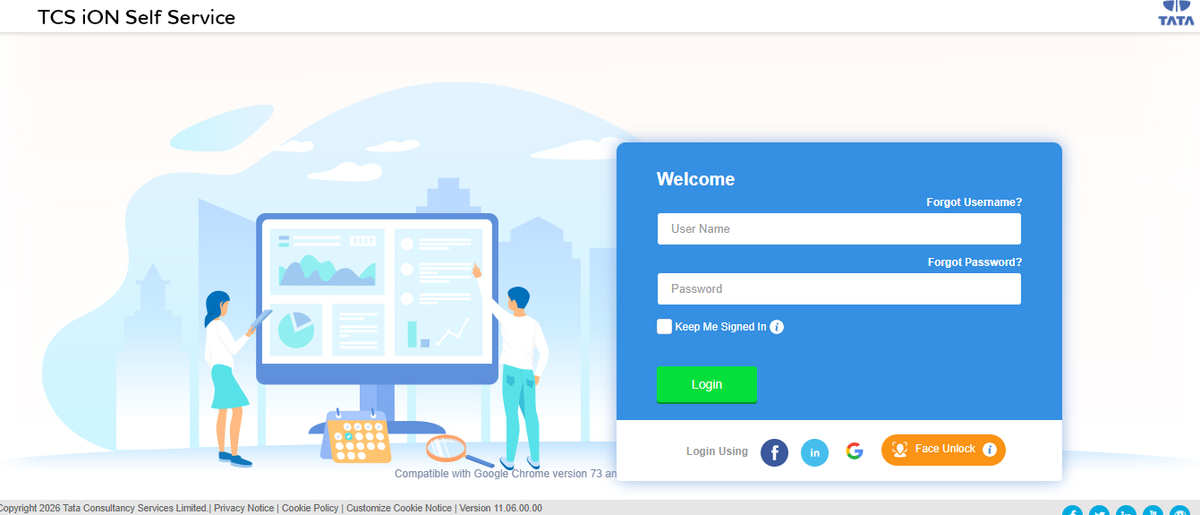
- Enter the Login ID. It is the hall ticket number followed by @svu.com.
- Enter the password given by the college.
- Click Login. The student homepage opens.
- Click MY RESULT on the homepage.
- Select the semester details and click Search.
- Click View Exam Result to see subject-wise details.
- Click Print to save or print the result.
Example: A student with hall ticket number 2412345 logs in as 2412345@svu.com. The password comes from the college.
Problems Students Face While Checking the Result
Students commonly face three issues on the SVU result portal. Each has a simple fix.
- Password not known. The university does not send it to students. The college office or exam section shares it.
- Result not visible. The semester may not be declared yet. Students should match the course and semester with the date-wise table above.
- Wrong portal. Distance students searching the TCS iON page will not find their result. They use the CDOE portal.
What the SVU Online Result Shows?
The online result is a provisional record. The original marks memo comes later through the college. Students keep a printed copy as proof until then.
The result view usually carries these details:
- Student name and hall ticket number
- Course, semester and exam month
- Subject-wise marks or grades
- Pass or fail status in each subject
- SGPA for the semester, where the course follows grading
How SGPA Is Calculated in the SVU Result?
Most SVU programmes follow the Choice Based Credit System (CBCS). Each subject carries credits, and each grade carries grade points. The SGPA is the semester average of these points.
The formula is simple. Multiply the grade points of each subject by its credits. Add these numbers, then divide by the total credits of the semester.
Example: A student gets 9 points in a 4-credit subject. The same student gets 8 points in a 2-credit subject. The SGPA is (36 + 16) divided by 6, which is 8.67.
How to Apply for Revaluation and Retotaling After the SVU Result?
Students unhappy with their marks can ask for revaluation (RV) or retotaling (RT). Revaluation means a fresh check of the answer script. Retotaling means only the marks are added again. The university released a help manual for this process on May 29, 2026.
- Log in to tcsion.com/SelfServices with the same ID and password.
- Open MY RESULT, select the semester and click View Exam Result.
- Click the RT, RV and Personal Identification link at the bottom of the result.
- Log in again on the RT RV form page that opens.
- Click Create New RT RV Request.
- Select the semester, the exam and the request type, then click Submit.
- Tick one or more subjects. The fee for each subject shows on screen.
- Select the payment gateway and pay by card, UPI or net banking.
The total fee depends on the number of subjects selected. The university announces the window for each exam after the main result.
Important: A request without completed payment is not processed.
Revised marks appear on the same portal. B.Pharmacy II, IV and VI Semester revaluation results came out on August 24, 2026.
What Students Do After the SVU Result?
Students who fail a subject appear for it in the supplementary exam. The exam application also runs on the TCS iON portal. Final-year students planning PG study can check SVU admission details for the next cycle.
The provisional certificate and original degree need a separate payment. Students pay on svuexams.edu.in. Students apply there after the final semester result is out.
Check Out: SVU Tirupati Questions and Answers
Frequently Asked Questions
Ques. What is the login ID for the SVU result portal?
Ans. The login ID is the hall ticket number followed by @svu.com. For example, hall ticket 123456 becomes 123456@svu.com.
Ques. Where do SVU students get the result password?
Ans. The college shares the password with its students. Students should contact the college office or exam section.
Ques. Can SVU results be checked without logging in?
Ans. No. In 2026, results open only after login on the TCS iON Self Service portal. The public results page lists the release dates only.
Ques. Is the SVU online result valid as a marksheet?
Ans. It is a provisional record only. The original marks memo comes later through the college.
Ques. Has the SVU UG I Semester result been declared?
Ans. The 2026 list shows UG III and UG V Semester results so far. The UG I Semester result is expected after the December semester exams.
Ques. Who should SVU students contact for result problems?
Ans. Students first approach their college exam section. The university also lists registrar@svumail.edu.in and phone number 0877-2289545 for queries.
Ques. How can employers verify an SVU certificate?
Ans. The university checks certificate genuineness through email. Requests go to verify@svumail.edu.in.


.jpeg?h=132&w=263&mode=stretch)






Comments